
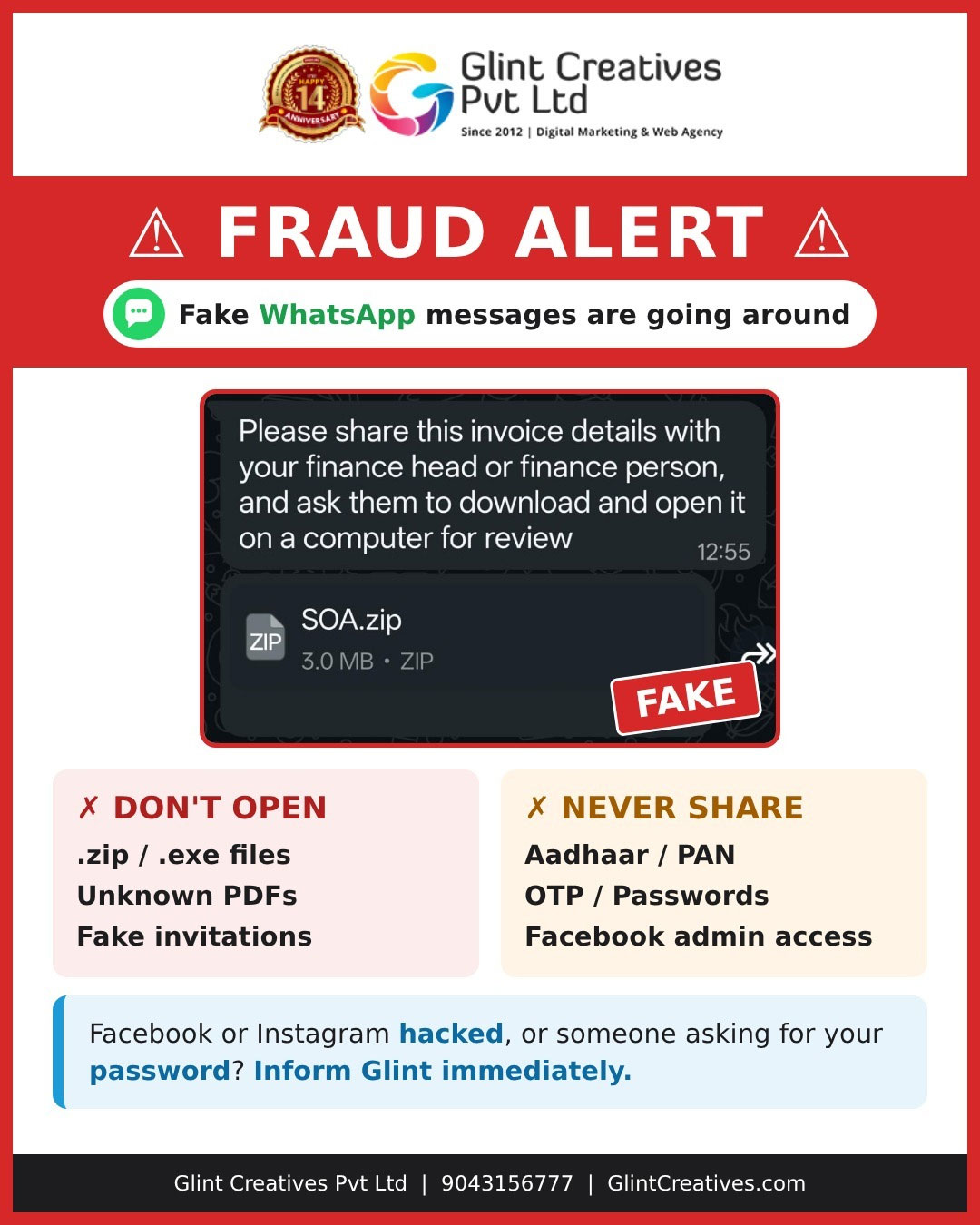
Your business runs on chat apps. So do scammers.
Treat every unexpected file, link or request for sensitive details as unverified, even when it comes from someone you know. Confirm with the sender on a separate, trusted channel before you open, share or grant access to anything.
Online communication is now part of everyday business. Invoices, documents, client conversations and social media management all move through WhatsApp, Facebook and Instagram.
That same convenience makes these platforms a favourite route for cybercriminals, who use them to spread fraudulent messages, malicious attachments and phishing links.
At Glint Creatives, our clients' digital safety is a priority. This advisory covers the most common fraud attempts we see and the practical steps businesses and individuals can take to protect their accounts and confidential information.
Beware of fake WhatsApp messages, even from known contacts
One of the most worrying threats is a fraudulent message that appears to come from someone familiar. Criminals compromise a person's account and then use it to message that person's friends, colleagues and business connections.
Because the message arrives from a saved contact or a number you have trusted before, it can look completely genuine.
Common red flags
Avoid opening suspicious files and attachments
Harmful attachments are used to spread malware, steal information and gain unauthorised access to devices and accounts. They are often disguised as ordinary business documents so that you will open them without a second thought.
ZIP files
Compressed folders can hide malicious scripts or executable files.
EXE files
Unknown executables can install harmful software on your device.
Invoices & SOAs
Fake financial documents can trick businesses into installing malware or making payments.
Unexpected PDFs
May carry suspicious links or exploit weaknesses in outdated software.
Fake invitations
Can redirect you to phishing websites or malicious downloads.
Protect your Facebook and Instagram business accounts
For a business, these platforms carry your brand communication, customer engagement and advertising. Unauthorised access can disrupt operations, compromise customer conversations and expose your ad accounts to misuse.
Attackers typically try phishing messages, fake Meta support notices, fraudulent copyright complaints or requests for administrator permissions.
Your account security checklist
Tap each item as you complete it. Nothing is stored.
- Turn on two-factor authentication (2FA).
- Use a strong, unique password for each account.
- Never share passwords or authentication codes.
- Review administrator permissions regularly.
- Give Meta Business access only to verified individuals.
- Remove former employees and unknown users.
- Ignore links claiming your account will be suspended.
- Watch for unusual logins and ad account changes.
- Secure the email accounts linked to your profiles.
What should you do if your account is hacked?
If you suspect your WhatsApp, Facebook or Instagram account has been compromised, acting quickly limits the damage. Work through these steps in order:
Review active sessions
Sign out of unfamiliar devices and remove unauthorised access.
Enable two-factor authentication
Add protection with an authenticator app or another supported method.
Check connected accounts
Review linked email addresses, phone numbers, business accounts and admin permissions.
Inform your contacts
Warn colleagues, customers and friends if suspicious messages went out from your account.
Report the incident
Use the official WhatsApp, Facebook or Instagram recovery and reporting options.
Contact Glint Creatives
If we manage your business social media, tell our team immediately. We'll help review the affected digital assets and guide you through recovery.
Simple cybersecurity practices every business should follow
Cybersecurity isn't only the IT team's job. Every employee, owner and social media administrator plays a part, and a few basic habits significantly reduce exposure to common scams.
Verify before opening
Confirm unexpected attachments and links with the sender.
Think before clicking
Be wary of links that create urgency or pressure.
Keep software updated
Install security updates for your OS, browser and apps.
Use strong authentication
Enable 2FA wherever it is offered.
Limit permissions
Give access only to people who genuinely need it.
Don't forward suspicious messages
Stop unverified files and links from spreading.
Report unusual activity
Tell the right support team when something looks off.
Building awareness across your organisation is one of the most effective ways to reduce the risk of digital fraud.
Glint Creatives: helping clients stay digitally aware
Our relationship with clients goes beyond website development, digital marketing campaigns and social media management. We understand how important it is to protect business communication channels, digital assets and online accounts.
Through regular awareness and communication, we encourage clients to stay informed about emerging digital risks and follow responsible account management practices.
Whether it's a suspicious WhatsApp attachment, a fraudulent login request or unusual activity on Facebook or Instagram, early identification and timely reporting make all the difference.
When in doubt, remember three steps
Digital fraud can affect anyone, whatever the size of the business or level of technical experience. A message that looks harmless may be an attempt to steal information or take over an account. Before opening an unexpected file, sharing confidential information or granting access, pause and verify.
Avoid suspicious attachments and unfamiliar links.
Never circulate potentially harmful messages or files.
Confirm the sender through a trusted channel and delete fakes.
A few seconds of caution can prevent serious security problems. Stay alert, protect your information and keep your business accounts secure.
Frequently asked questions
Q01Is a WhatsApp attachment safe if it comes from a saved contact?
Not automatically. Scammers can take over a person's account and message their contacts. If a file or link is unexpected, confirm with the sender through a call or another trusted channel before opening it.
Q02Which WhatsApp files are most risky?
Unexpected ZIP files, EXE files, invoices or statements of account, unsolicited PDFs and fake wedding or event invitations. Not every such file is harmful, but each unexpected one should be verified first.
Q03Will Meta, WhatsApp or my bank ask for my OTP or password?
Genuine support teams should not ask you to share passwords or OTPs. Treat any such request as suspicious and verify through the official app or website.
Q04What should I do first if my account is hacked?
Change your password if you still have access, sign out of unfamiliar devices, turn on two-factor authentication, check linked emails, phone numbers and admins, warn your contacts and report through the platform's official recovery options.
Q05How do I protect a Facebook or Instagram business account?
Enable two-factor authentication, use unique passwords, review and remove unneeded Meta Business access, secure the linked email account and verify any warning inside the official app rather than through links.